
How to Purchase a 5th Grade Recognition Ad in the Yearbook
Families may purchase one custom recognition ad per student to celebrate their 5th grader in this year’s yearbook. Ads must be created and purchased on a desktop or laptop computer (not a mobile device). The cost is $5.
Step-by-Step Directions
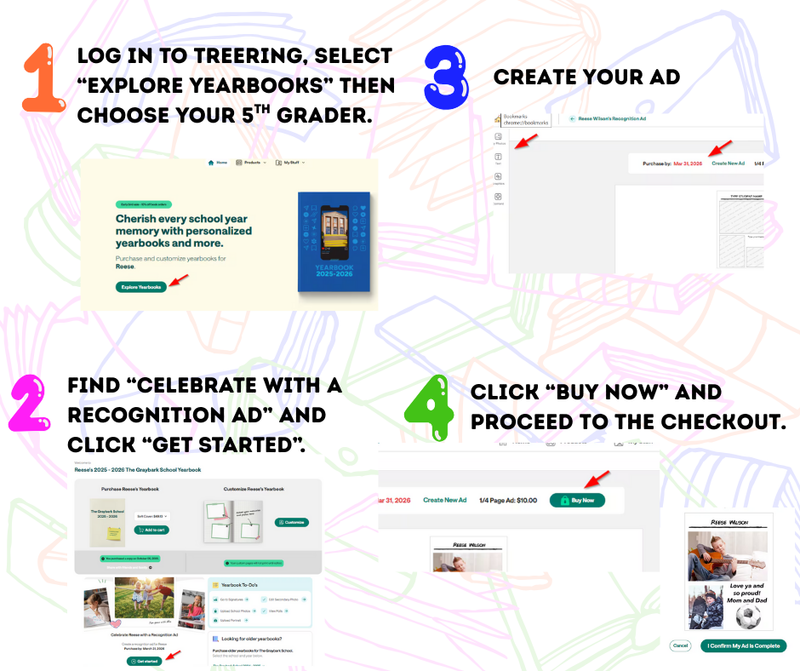
Log in to Treering
Go to your Treering account and select Explore Yearbooks.
Select Your Child
Confirm the correct student name and school appear at the top of the page.
Scroll to Celebrate with a Recognition Ad and click Get Started.
Create Your Ad
Add photos, text, and graphics using the toolbar on the left.
Edit the template text and drag photos into the placeholders.
Make sure all content stays inside the ad margins—anything outside will not print.
Review Important Details
Deadline to order ads will be April 8, 2026.
Ads are only for 5th grade students.
Purchase the Ad
Click Buy Now, confirm your ad is complete, and proceed to Checkout.
Payment options include credit card or PayPal.
Helpful Notes
Only one recognition ad per student is allowed.
Background images are not available, but background colors can be adjusted.